Replay
VOSS RT has three Operation Modes:
-
Normal - This is the normal or Real Time mode where all incoming devices are used and applied.
-
Simulation - In this mode it is possible to move the equipment in various areas and manually change inputs to VOSS RT. See: Simulation.
-
Replay - See below.
On this page:
On vessels with various VOSS RT Workstations, only the Normal Operation Mode is available. The reason is that Replay and Simulation modes can produce outputs that could jeopardize the correct behavior of VOSS RT in Normal mode on other Workstations used for navigation or operation. On these vessels, you can always inspect areas in the project by left mouse clicks and Zoom in / Zoom out, or by un-ticking the Follow Vessel option.
In the Replay Operation Mode you can play back the Raw data files (*.BCLF, see: Logging), in which all incoming and outgoing communication is recorded. While playing back, you will have all functionality as if your were in Normal Mode; you can change and adapt all settings.
 Tip:
if you use Replay to analyze an important event like a QHSE incident,
record your Replay into a video or snapshots to share with others. See:
Make
video or snapshot
Tip:
if you use Replay to analyze an important event like a QHSE incident,
record your Replay into a video or snapshots to share with others. See:
Make
video or snapshot
Start Replay
To start the Replay mode:
 MENU > Application
Settings > Operation Mode > Replay
MENU > Application
Settings > Operation Mode > Replay
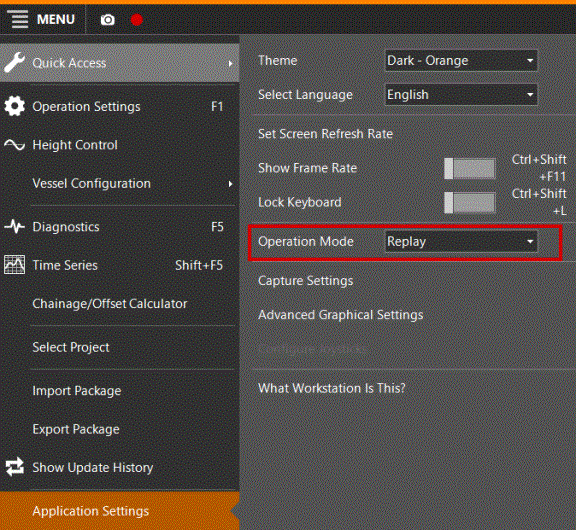
The Replay window will open.
Replay Mode
At the top of the screen, this button on the Caption Bar  will also open the Replay dialog:
|
Replay |
|
|---|---|
|
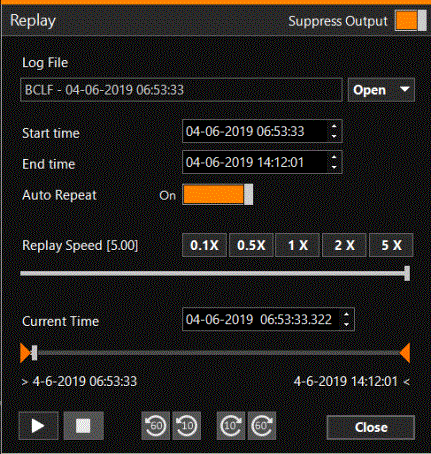
Suppress Output |
If you don't want your Replay to be recorded in the log files, leave Suppress on. |
|
Log File |
Open a BCLF log file from the SDM |
|
Start / End time |
The start and end date and time from the log file are displayed. To replay a certain part of the log file, type the required start/end times, or click on a part of the date/time stamps and adjust with the up and down arrows. |
|
Auto Repeat |
'On' will create a loop: at the End time replay will start again at the Start time. |
|
Replay Speed |
Pick the Replay speed by clicking the corresponding button or adjust it using the sliding bar. |
|
Current Time |
Start at a specific time by typing the current time, using the up and down arrows after clicking, or using the sliding bar. |
|
Bottom row of buttons |
Play, pause, jump forward or backward by 10 or 60 second steps. |

I cannot find my BCLF file to Replay
Maybe the settings in VOSS.NET prevent your files from being stored on your SDM.
Check under: SDM > Settings > tab page Logging > Days based retention setting > Keep x days
Make sure that the recording date of your BCLF falls within the period by adjusting the number of days.