Create a difference color table
 Operation Settings
> Color Tables > Selection button Difference
Operation Settings
> Color Tables > Selection button Difference
For this color table we will use the example of a trench backfill operation. The design is the in-survey (original seabed) and the client requires the trench to be filled not less than to original seabed and maximum 0.50m above it. The superintendent has planned to build layers from the trench bottom (-3.0m below seabed) increasing with 0.75m.
An easy way is to start with a new color table is using a Difference Template (via Add button). Parameters mentioned above can be entered here.
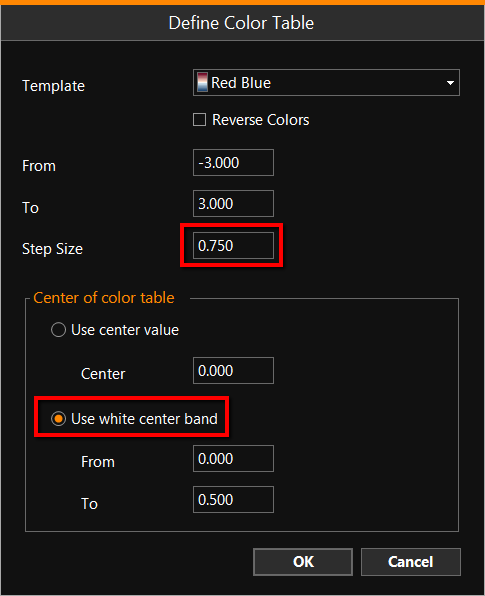
When the color table entry is accepted, the result is visible in the panel below:
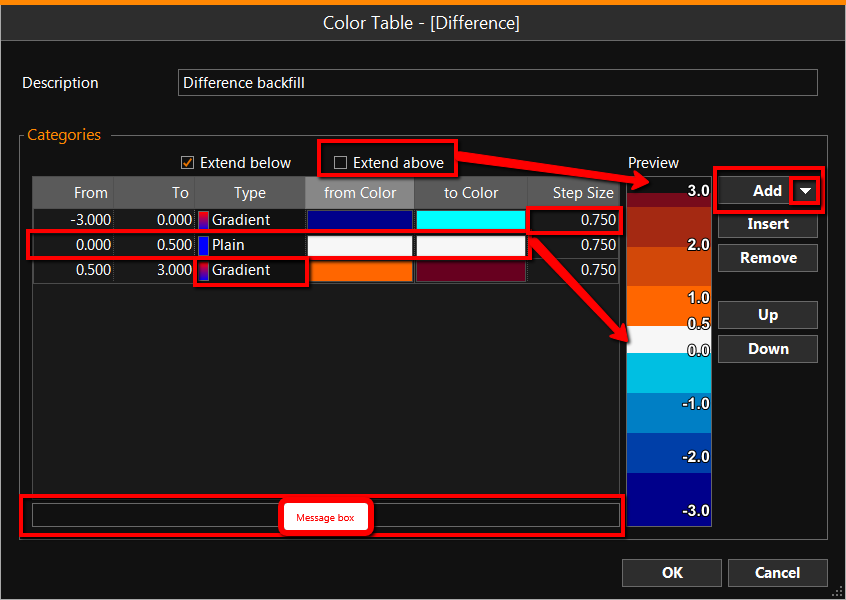
Depth bounds are entered from deep to shallow, starting with the above reference category on top. In the Message box advice appears when an entry is not feasible, using a template this is unlikely to happen. The Preview gives an actual impression of the result. Several color types are used in this example, Plain, with a fixed color as a tolerance bound. Gradient colors are created within a bound along the color spectrum. The Step Size defines the smoothness of the color range, in this case it represents layers of 0.75m. 'Extend above' and 'Extend below' determine if the top and bottom color have to exist beyond the given limits.
Although starting with a template doesn't mean modifications are not possible.
Once back online, the color table configuration can be easily accessed by double clicking on the color bar.
See also: Color Settings