Create a depth color table
 Menu > Operation Settings
> Color Tables > Difference, selection button [...] > New
Menu > Operation Settings
> Color Tables > Difference, selection button [...] > New
For this color table we will use the example of a medium sized hopper dredger.
The criteria are: draught empty 2.5m and draught loaded 6.0m. The project is in the Caspian Sea where no tide is applicable.
Use the 'Add' button to enter new depth definitions.
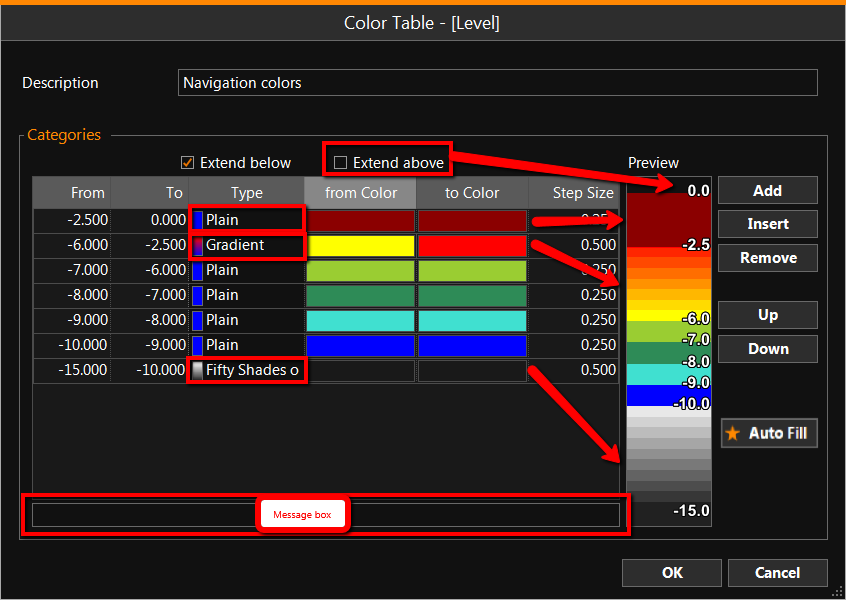
Depth bounds need to be entered from deep to shallow, starting with the shallowest category on top.
In the Message box advice will appear when an entry is not feasible.
The Preview gives an actual impression of the result. Several color types can be used in this example: Plain, with a fixed color per bound. Gradient colors are created within a bound along the color spectrum. The deepest bound presents one of many predefined color patterns. The Step Size defines the smoothness of the color range. 'Extend above' and 'Extend below' determine if the top and bottom color have to exist beyond the given limits.
Once back online, the color table configuration can be easily accessed by double clicking on the color bar.
See also: Color Settings