Active Structure Target
This option is only available when blocks are defined in your project and a block placing piece of equipment is selected.
 MENU > Operation Settings > General > Active Structure Target
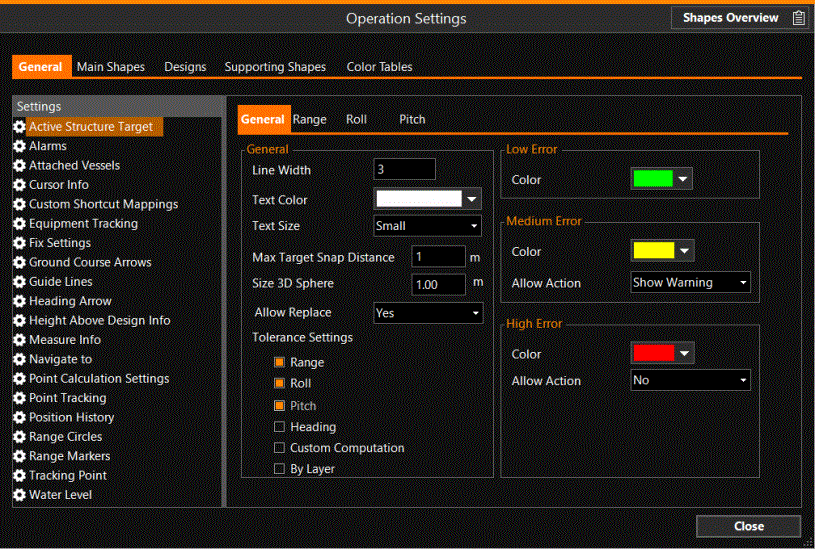
General
|
General |
|
|---|---|
|
Line Width |
The operator will be shown which Target is active by drawing a circle around it, the line width of this circle is specified here. The color of the circle is defined at High Error Range. The Target ID name of the active target will also pop up, in the color and text size as specified here. |
|
Text Color |
Select a color for the text (the Target ID name of the active target) in the Top View. |
|
Text Size |
Seems not to work. |
|
Max Target Snap Distance |
Targets are predefined positions
prepared by the surveyor, for the operator to know where to install the drains/xblocs. VOSS RT |
|
Size 3D Sphere |
Adjust the size of the sphere in the 3D View, representing the location for the bloc. |
|
Allow Replace |
Indicate whether a bloc is allowed to be picked up again when it moves after being placed. |
|
Tolerance Settings |
The items can be switched on in the tab page Layers. See below. When do they light up so they can be activated here? These options show in the bars in the Crosshair view. |
|
Low Error |
|
|
Color |
When you are in Low Error Range, the color of the circle becomes the one defined at Low Error Range (by default green). The block will also be shown in this color. |
|
Medium Error |
|
|
Color |
When you are in the Medium Error Range, the color of the circle becomes the one defined at Medium Error Range (by default yellow). The block will also be shown in this color. |
|
Allow Action |
If Allow Action is set to Show Warning, a Fix can be recorded but first a warning is given whether you are sure that you want to Fix at this position. |
|
High Error |
|
|
Color |
When you are in the High Error Range, a circle will be drawn in the color defined at High Error Range (by default red). The block will also be shown in this color. |
|
Allow Action |
Normally, at High Error Range, the Allow Action is set to No and no Fix can be recorded. |

Layers
Depending on which layers are activated under tab page General, extra tab pages will appear for Range/Roll/Pitch/Heading/Custom Computation.
Range
These settings are meant for use in the Crosshair View.
|
Range |
|
|---|---|
|
Low Threshold |
When you are nearing the target, the Low Threshold circle (green) will appear when you are closer than the value entered here. |
|
Medium Threshold |
When you are approaching the target, the Medium Threshold circle (yellow) will appear when you are closer than the value entered here. |