Active Route
In VOSS RT the Route Routes are aiding lines used in the construction of infrastructure. They usually correspond to the center or a standard offset to the center of that structure. A Centerline can be a Route. A Pipe or Pipeline can also be a Route.
is your reference line. The route can be a Centerline An aiding line used in the construction of infrastructure. It usually corresponds to the center of that structure. or a Pipeline.
Routes are aiding lines used in the construction of infrastructure. They usually correspond to the center or a standard offset to the center of that structure. A Centerline can be a Route. A Pipe or Pipeline can also be a Route.
is your reference line. The route can be a Centerline An aiding line used in the construction of infrastructure. It usually corresponds to the center of that structure. or a Pipeline.
Values of Chainage or KP and Offset will be shown with reference to the Active Route.
There can only be one Route active at a time. The Active Route is one of the Main Shapes.
Under Main Shapes A geometric entity or a collection of such entities. Each entity is described by basic geometry such as a point, a line or an arc. Examples of shapes are: Route, Centerline, Waypoints, Fix Set, Dump Boxes, Progress Grid Model, Designs, etc. the Active Route is selected:
 MENU > Operation
Settings > Main Shapes > Active Route, or
MENU > Operation
Settings > Main Shapes > Active Route, or
Keyboard: F1 >
Main Shapes > Active Route
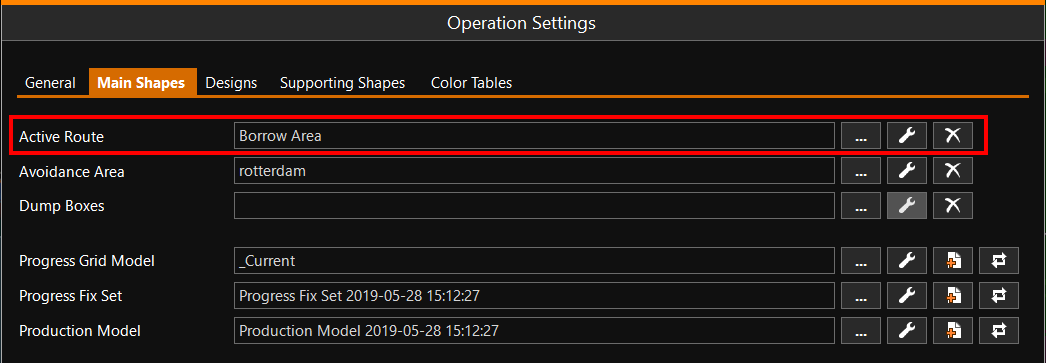

Click [...] to select your Active Route.
Click [spanner] to adapt the way the Route is shown.
Click [X] to remove the Active Route.