Shapes Overview
Check the last updates of all items in use in your project.
 MENU > Operation
Settings > Shapes
MENU > Operation
Settings > Shapes A geometric entity or a collection of such entities. Each entity is described by basic geometry such as a point, a line or an arc. Examples of shapes are: Route, Centerline, Waypoints, Fix Set, Dump Boxes, Progress Grid Model, Designs, etc. Overview or:
Keyboard: Shift + F1


Clicking on the Updates button on the Caption Bar also leads to the window named Shapes Overview:
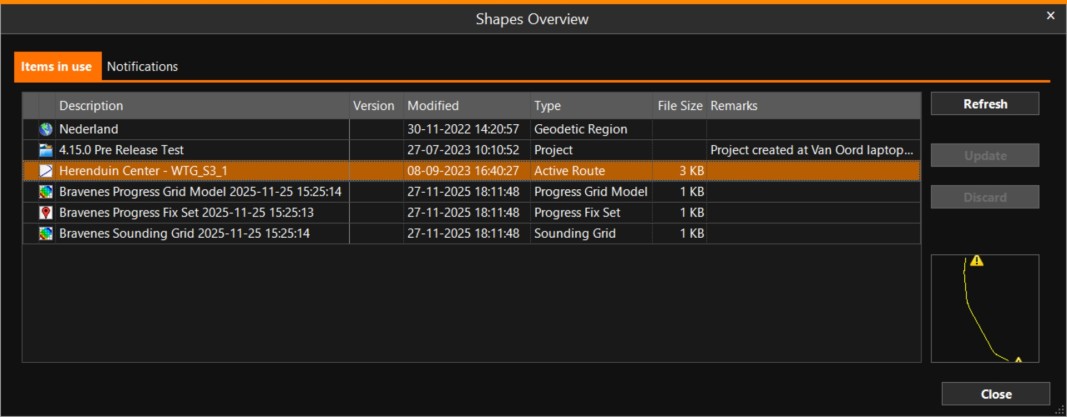
The overview shows most available properties of the meta data to see what data is in use and if it is up-to-date.
The two buttons on the right side (Update/Discard) will be made available in future versions. They can then be used to apply an available update that was sent to the vessel automatically (vnar/prup). When this is implemented (in a next version), the Updates button on the right side of the title bar will be highlighted to indicate an update is available.
Dockable Menu
It is possible to create a shortcut button to this window.
To set this up, go through the following series of options:
MENU > Screen Layout > Add View > All > Dockable Menu > Add
This will open an empty Menu page.
Right-click in it to open the View Settings menu, then follow this series of options:
Edit Items > Additional Settings >
Shapes Overview >  > OK
> OK
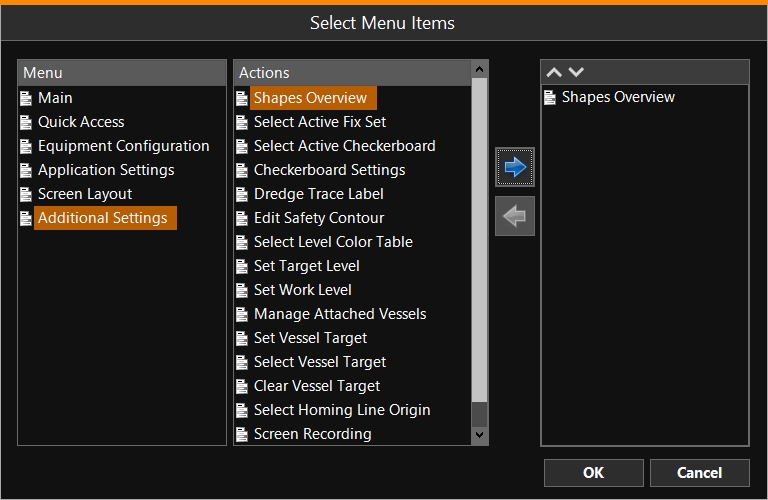
The created button will lead directly to the Shapes Overview window when clicked on.