Runlines
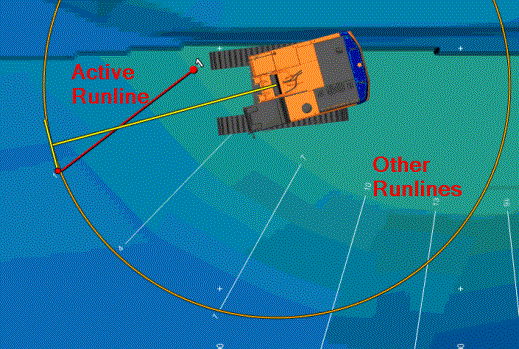
Runlines Sets of pre-defined lines which can be used as a navigational aid during the execution of a survey. They are straight line segments which are positioned in a pattern defined by the Surveyor. are sets of pre-defined lines which can be used as a navigational
aid, for example during the execution of a survey. They are straight line
segments which are positioned in a pattern defined by the Surveyor.
Sets of pre-defined lines which can be used as a navigational aid during the execution of a survey. They are straight line segments which are positioned in a pattern defined by the Surveyor. are sets of pre-defined lines which can be used as a navigational
aid, for example during the execution of a survey. They are straight line
segments which are positioned in a pattern defined by the Surveyor.
The
Runline Shape A geometric entity or a collection of such entities. Each entity is described by basic geometry such as a point, a line or an arc. Examples of shapes are: Route, Centerline, Waypoints, Fix Set, Dump Boxes, Progress Grid Model, Designs, etc. is selected under Main Shapes. Each Runline has a unique
number and only one Runline is Active at the same time.
On this page:
Select or change Runlines shape file
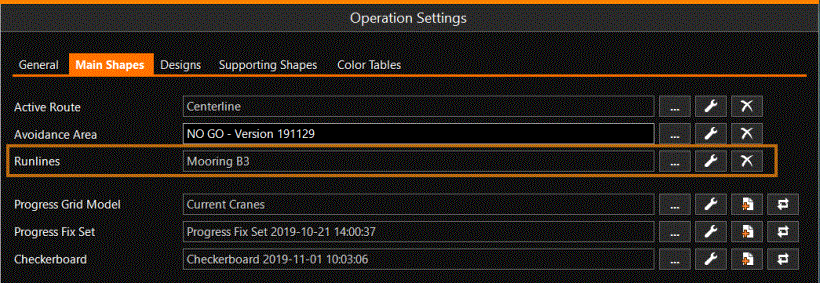
Runlines available for your operation can be selected and changed under the Main Shapes:
 MENU > Operation
Settings > Main Shapes > Runlines or:
MENU > Operation
Settings > Main Shapes > Runlines or:
Keyboard: F1 >
Main Shapes > Runlines
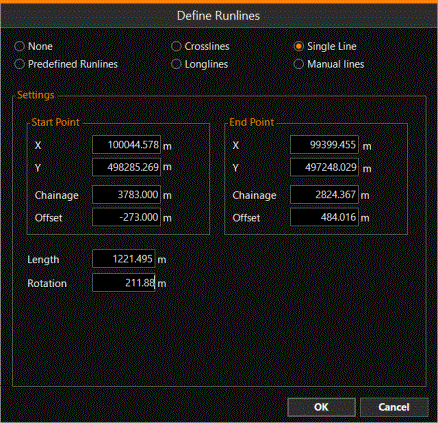
Click [...] to select your Runlines Shape or to define the lines on the spot:
Click [spanner] to adjust the way the Runlines are shown; colors etc. and for example show only the Active Runline or all Runlines
Click [X] to remove the selected Runline Shape
Runline Selection and Reverse Runline
Under Quick Access you will find the option to choose a Runline and Reverse it:
MENU > Quick Access
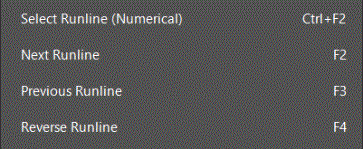
Select a Runline from a list from all lines in the Shape file
Reverse will swap the start and end of the line; Inline and Offline to Runline are also adjusted.