Heading Arrow
The heading arrow is an arrow in the direction of the heading f
your Equipment In VOSS RT Equipment is the collective name for all marine and land machinery provided with positioning (and attitude devices)..
There can only be one Heading Arrow.
In VOSS RT Equipment is the collective name for all marine and land machinery provided with positioning (and attitude devices)..
There can only be one Heading Arrow.
You can choose at what point on your equipment the arrow starts, how it looks and choose to show or hide it.
On this page:
Show Heading Arrow
To switch on or off:
 Right mouse click in
Top View > View Settings > Show Heading Arrow
Right mouse click in
Top View > View Settings > Show Heading Arrow
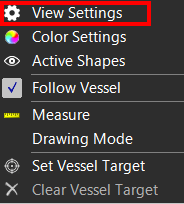
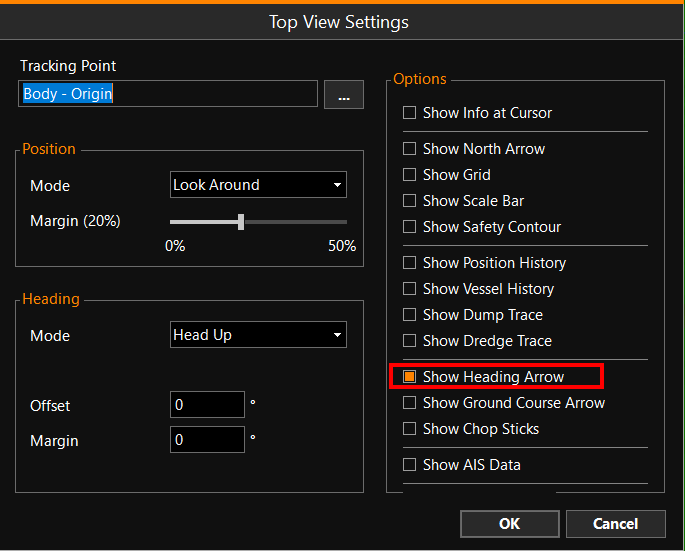
Heading Arrow Settings
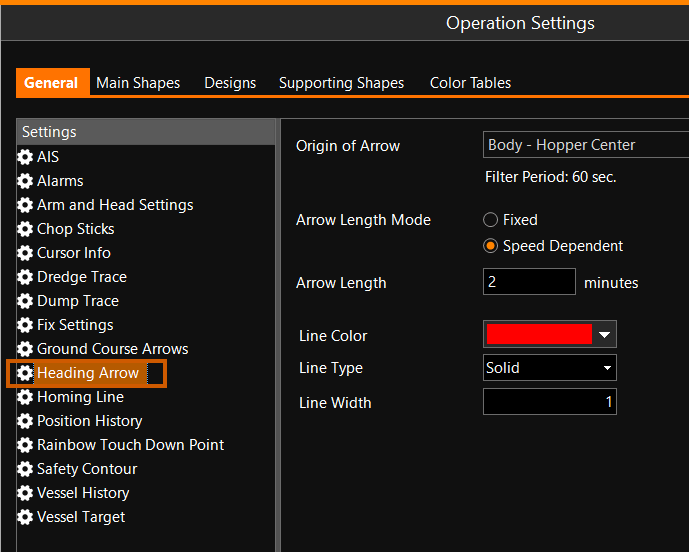
To adjust the way the Heading Arrow is shown:
MENU > Operation
Settings > General > Heading Arrow or:
Keyboard: F1 >
General > Heading Arrow
|
Heading Arrow |
|
|---|---|
|
Origin of Arrow |
Choose at which local point the arrow starts. |
|
Filter Period |
Is for information only; it is chosen by VOSS RT depending on your equipment type. |
|
Arrow Length Mode |
You can either choose a Fixed length arrow, or an arrow that changes with Speed over ground. |
|
Arrow Length |
Adjust the value to obtain the length that suits your need. |
|
Line Color/Line Type/Line Width |
Define the way the arrow will be displayed in your Top View. |