Frame Rate (FPS)
The Frame Rate is the number of images produced by the software, expressed in FPS, which means Frames Per Second.
A high Frame Rate will have the effect of a smoother look.
A low Frame Rate may have various causes. If you want to see at which frame rate your VOSS RT software runs:
 MENU > Application
Settings > Show Frame Rate or:
MENU > Application
Settings > Show Frame Rate or:
Keyboard: Ctrl+Shift+F11
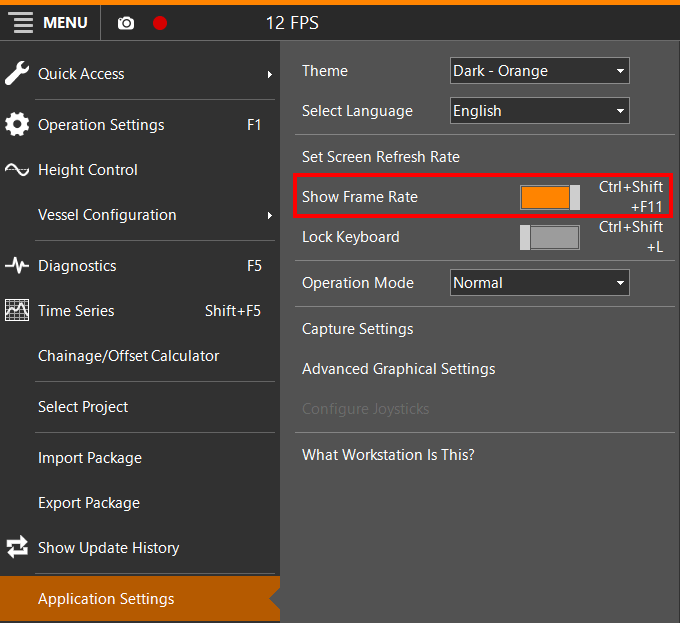
The Frame Rate will be shown on the Top Left side of the VOSS RT screen:

Set Screen Refresh Rate
Depending on your equipment type, number of connected devices and number of views that need to be refreshed, VOSS RT will draw more from your hardware. It may be necessary to slow down the Screen Refresh Rate.
MENU > Application
Settings > Set Screen Refresh Rate
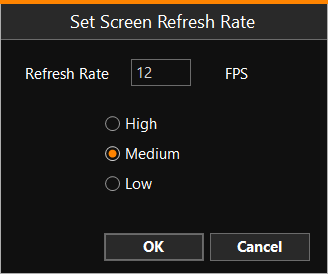
Choose between High, Medium or Low. Medium is recommended.