Avoidance and Restricted Area(s)
Avoidance Areas are areas that need to be avoided. There are two types of Avoidance areas:
-
Obstructions
-
Restricted areas
Obstructions are marked with a double outline, a yellow triangle and the word Obstruction. If by accident an obstruction avoidance area is entered, no alarms are given. (See video below)
Restricted areas are used for larger avoidance areas. Entering a Restricted area can give various alarms on screen and Restricted Area Alarms.
On this page:
Select or Change Avoidance Area
 MENU > Operation
Settings > Main Shapes
MENU > Operation
Settings > Main Shapes A geometric entity or a collection of such entities. Each entity is described by basic geometry such as a point, a line or an arc. Examples of shapes are: Route, Centerline, Waypoints, Fix Set, Dump Boxes, Progress Grid Model, Designs, etc. > Avoidance Area or:
Keyboard: F1 >
Main Shapes > Avoidance Area
The Avoidance Area file that is selected can contain one or more obstructions and restricted areas.
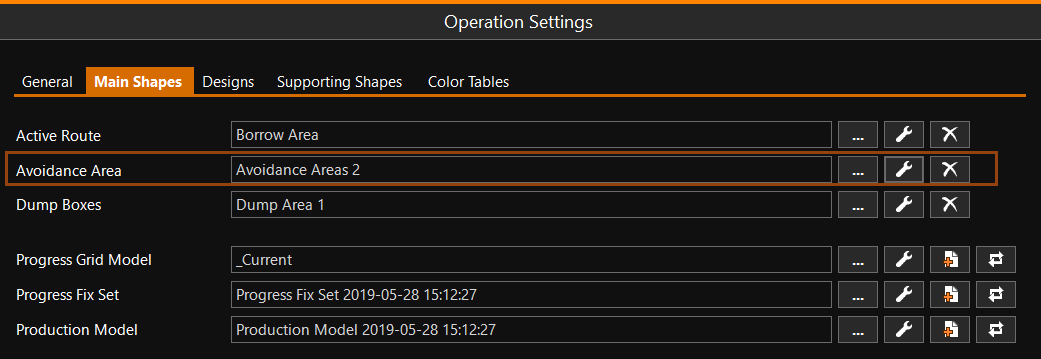
Click [...] to select your Avoidance Area.
Click [spanner] to adjust the way the Avoidance Area is shown.
Click [X] to remove the selected Avoidance Area.
Restricted Area Alarms
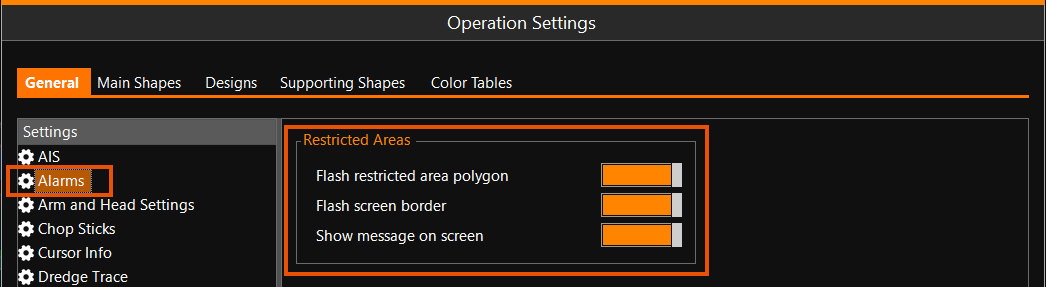
Three types of Alarms can be set that will show when part of your vessel outline crosses the border of a Restricted Area:
-
The outline of the Restricted Area will start flashing in the Top View
-
The border of the VOSS RT screen will start flashing
-
A message will be shown on screen
The Alarm settings can be adjusted here:
MENU > Operation
Settings > Alarms: